
How to Use the FHG Lists on Football Pro Predictions
A beginner-friendly guide to finding, filtering, reading, exporting and reviewing the First-Half Goals (FHG) Lists on Football Pro Predictions.
Introduction: What the FHG Lists Page Is For
FHG means First-Half Goals. The Football Pro Predictions FHG Lists page brings together current first-half-goal shortlist strategies, their grouped outputs and daily CSV exports. It also includes a separate BTB! FHG List, described on the page as the original “Bring the BOOM! 1st Half Goal List.”
Use the page as a research and monitoring view: select the date and competition preferences that matter to you, inspect the fixtures and strategy labels, then keep records if you want to review the list later. Inclusion in a shortlist is not a guarantee that a first-half goal will occur, or that any betting outcome will follow.
Before You Start: A Quick Tour of the Page
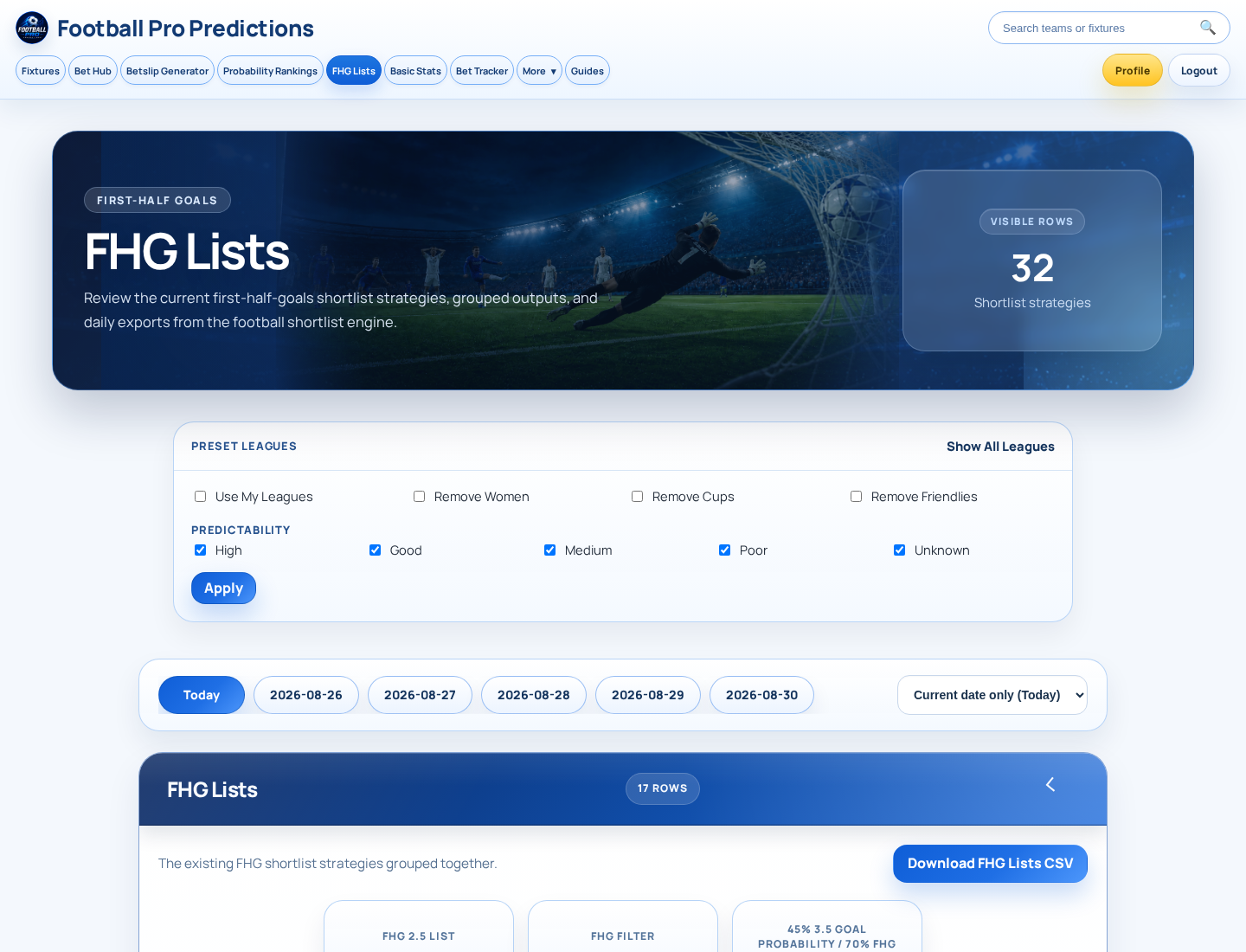
The inspected FHG Lists interface has controls for preset leagues, competition exclusions, predictability labels and date selection. Below those controls are the grouped FHG Lists, the separate BTB! FHG List and a download action for each list. The page also displays a visible-row total and a shortlist-strategy total in the inspected view.
Key takeaways
- Preset league controls: “Show All Leagues” and “Use My Leagues”.
- Competition controls: “Remove Women”, “Remove Cups” and “Remove Friendlies”.
- Predictability choices: High, Good, Medium, Poor and Unknown, followed by Apply.
- Date choices, including Today and Current date only (Today).
- The grouped FHG Lists, the BTB! FHG List and their separate CSV downloads.
Step 1: Choose the Date You Want to Review
Choose the fixture date before interpreting the lists. The page shows a Today option, a Current date only (Today) option and a sequence of dated choices. Selecting the relevant date first helps ensure that the fixtures, live states and elapsed times you review belong to the period you intend to monitor.
Step 2: Set Your League and Competition Preferences
Under Preset Leagues, use “Show All Leagues” when you want the broadest displayed view, or select “Use My Leagues” when you want to work from your own league selection. The interface also presents controls to remove women’s competitions, cups and friendlies.
These controls are ways to narrow a working view; they are not quality ratings for competition types. The supplied material does not confirm how My Leagues are configured, whether a sign-in is required, or whether these selections persist between visits. Treat those details as product checks rather than assumptions.
Step 3: Apply a Predictability Filter Carefully
The page offers five predictability labels: High, Good, Medium, Poor and Unknown. Choose the view you wish to inspect and use Apply. This lets you focus the display according to the labels available in the interface.
Step 4: Read the Grouped FHG Lists
The main FHG Lists section states that it groups existing FHG shortlist strategies together. In the inspected view, the displayed group names include “FHG 2.5 List”, “FHG Filter” and “45% 3.5 Goal Probability / 70% FHG”. Each row carries its strategy name, so you can see why that row appears in the grouped output.
A fixture may appear more than once if it qualifies under more than one strategy. In the inspected view, Tartu Kalev vs Tallinna Kalev II appears under all three displayed strategy names. That is one fixture with multiple strategy entries, not three separate matches. When reviewing or exporting the list, deduplicate by fixture if you need a match-level view, while retaining the strategy names as useful context.
Step 5: Understand Each Fixture Row
The grouped FHG table shows KO Time, Country, League, Fixture Name, Strategy, Live, Elapsed, FHG Odds, Hit, Met 1.6 and Add. The BTB! table uses the same practical fields except Strategy, because it is presented as its own list.
| Field | How to use it | Important limit |
|---|---|---|
| KO Time | Identify the scheduled time displayed for the fixture. | Timezone handling is not defined in the supplied material. |
| Country and League | Confirm the competition context before reviewing a fixture. | These fields do not themselves indicate quality or suitability. |
| Fixture Name | Identify the match and deduplicate repeated entries. | The same fixture can have multiple strategy rows. |
| Strategy | See the attached grouped-list strategy. | The supplied material does not define each strategy’s methodology. |
| Live and Elapsed | Check the displayed match state and elapsed figure. | Do not infer settlement or data-update rules from these fields. |
| FHG Odds | Record a displayed value when one is present. | Market source, definition and blank-value meaning are not supplied. |
| Hit and Met 1.6 | Record the displayed symbol or text for later review. | Their product definitions require first-party confirmation. |
| Add | Use the visible control if you want to track a row. | The storage destination and sign-in requirement are not confirmed. |
Step 6: Use Live Status and Odds as Context, Not a Promise
The inspected rows show states including FT, HT, LIVE and a dash, with elapsed values present on some rows. For example, FT is shown alongside elapsed figures in completed-looking rows, while LIVE is shown alongside in-progress elapsed figures. A dash is also visible for some fixtures. Use these values to understand what the interface currently displays, rather than to make assumptions about a match or a market.
FHG Odds may be populated, such as 1.16 or 1.33 in the inspected view, or left blank. Do not treat a blank as a negative signal, and do not infer a bookmaker, market definition, settlement rule or performance implication from the column without verified documentation.
Step 7: Compare the Main FHG Lists with the BTB! FHG List
The main FHG Lists section combines multiple named strategies. The BTB! FHG List is separate and is described in the interface as the original “Bring the BOOM! 1st Half Goal List.” It has its own row count, table and “Download BTB! List” action.
| Stage | What to do |
|---|---|
| 1. Review the grouped list | Note the fixture and every attached strategy. |
| 2. Review BTB! | Search for the same fixture in the separate BTB! table. |
| 3. Record overlap | Mark a fixture that appears in both places, but count it once at fixture level. |
| 4. Keep the context | Retain the date, league, list name, strategy and displayed status in your notes or export. |
| 5. Avoid over-reading overlap | Appearance in more than one list is not a guarantee of a first-half goal or any outcome. |
Step 8: Add Fixtures and Download a CSV
Each displayed row includes an Add control. It is reasonable to treat this as a control for tracking a fixture, but the supplied interface text does not say where added fixtures are stored or whether sign-in is required. Confirm that behaviour in the product before relying on it as a saved-record feature.
Two downloads are confirmed: “Download FHG Lists CSV” for the grouped section and “Download BTB! List” for the BTB! section. For a simple review file, preserve the selected date, fixture name, country, league, strategy or list name, live status and elapsed value. Then deduplicate repeated fixture names before match-level analysis. The supplied material does not confirm the CSV’s full fields, encoding or whether the export reflects active filters, so check the downloaded file before building a repeatable process.
A Simple Daily FHG Lists Workflow for Beginners
Key takeaways
- Choose the date you want to review.
- Set league and competition preferences that fit your research scope.
- Select a predictability view and use Apply.
- Read each grouped-list row with its strategy label.
- Deduplicate fixtures that appear under multiple strategies.
- Check the separate BTB! FHG List for overlap.
- Use Add only after confirming how it stores fixtures, or download the relevant CSV for your own records.
- Review displayed status fields later without treating any label, odds value or shortlist entry as a promise.
Common Mistakes to Avoid
Frequently asked questions
What does FHG mean?
FHG means First-Half Goals, as shown by the page heading “FIRST-HALF GOALS.”
Why can the same fixture appear more than once?
The main section groups existing shortlist strategies. A fixture can appear in more than one row when it is attached to multiple strategies. Treat it as one match with multiple strategy entries.
What is BTB!?
The interface calls BTB! the original “Bring the BOOM! 1st Half Goal List.” The supplied material does not provide a fuller operational definition or methodology.
Can I download the lists?
Yes. The page displays “Download FHG Lists CSV” for the grouped list and “Download BTB! List” for the separate BTB! list.
Why are some odds or status-related fields blank?
The interface shows blank values in some rows, but the supplied documentation does not define why they are blank. Do not assign a meaning without product confirmation.
How do I focus on preferred leagues?
Use the visible “Show All Leagues” or “Use My Leagues” controls, plus the competition-removal controls where appropriate. How My Leagues are configured is not confirmed in the supplied material.
Key Takeaways
Key takeaways
- Choose the date and filters before assessing the displayed fixtures.
- Read the strategy field and preserve it when reviewing grouped-list rows.
- Deduplicate fixtures that qualify under multiple strategies.
- Compare the grouped FHG Lists with the separate BTB! FHG List without treating overlap as certainty.
- Use CSV exports for record-keeping, after checking what the exported file contains.
- Do not equate shortlist inclusion, predictability labels, odds or status fields with a guaranteed result.
Source and Product Checks
Primary product source reviewed: Football Pro Predictions, “Fhg Lists” page (/fhg-lists), using the supplied visible interface text.
Sources and further reading
- Football Pro Predictions — Football Pro Predictions
Put This Guide Into Practice
Use the live research tools to compare upcoming fixtures, probabilities and available prices. Always check current odds and stake responsibly.