
How to Use the Betslip Generator on Football Pro Predictions
A beginner-friendly walkthrough of Football Pro Predictions’ Betslip Generator, covering filters, market selection, odds controls, generation modes, saved presets and responsible interpretation of model-led betslips.
Introduction: What the Betslip Generator Does
Football Pro Predictions’ Betslip Generator is a Bet Builder Tool for creating structured football betslips. Its interface says that it uses model probabilities, value filters and controlled odds ranges. In practical terms, you choose the fixtures and markets you want the tool to consider, set the available controls, then generate a slip to inspect.
This guide covers the setup process, not a method for guaranteeing an outcome. A generated selection remains something to check: confirm the fixture, market wording, kickoff time and odds available through your bookmaker before taking any action.
Before You Start: A Quick Responsible-Use Checklist
Know the Main Areas of the Tool
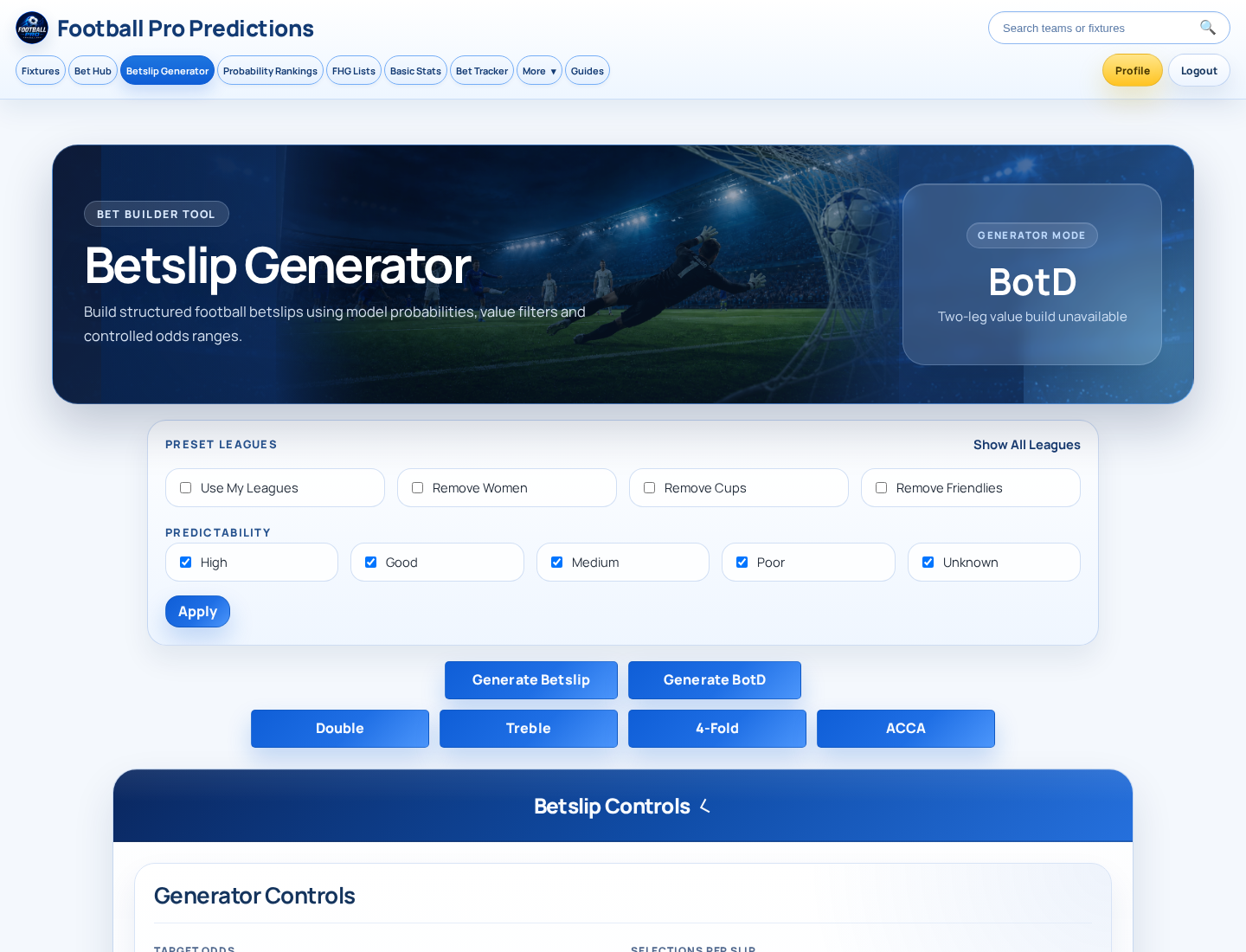
The page is organised around a few main decisions. Generator Mode contains BotD and generation controls. Preset Leagues provides Show All Leagues, Use My Leagues, Remove Women, Remove Cups and Remove Friendlies. Predictability offers High, Good, Medium, Poor and Unknown, followed by Apply.
Further down, Betslip Controls and Generator Controls include Target Odds, Selections per Slip, Odds per Selection, Time Duration (in Hours), Max Number of Betslips, Preset Name and Value Bets Only. Market groups let you select Match Result, Goals, Home Goals, Away Goals and Corners. A Saved Betslips area holds saved setups. Labels and layout can change, so capture and check screenshots immediately before publishing this guide.
A Beginner’s First Betslip: Recommended Walkthrough
For a first attempt, keep the setup simple. Open the Betslip Generator, choose the relevant generation route, optionally narrow the fixture pool, select a small set of markets you understand, set the available controls and select Generate Betslip. Review every returned leg rather than assuming the output matches your intention. If you want to reuse the setup, enter a clear preset name and use Save Betslip, then check the Saved Betslips area.
Step 1: Choose a Generator Mode and Slip Format
| Visible label | What can be said from the interface | What to verify |
|---|---|---|
| BotD | A Generator Mode label shown on the page. | Its definition and selection process are not established by the visible interface. |
| Generate Betslip | A button for producing a betslip after configuration. | The exact output logic and ranking rules are not displayed. |
| Generate BotD | A separate visible generation button. | How it differs from Generate Betslip needs first-party product guidance. |
| Double, Treble, 4-Fold | These are visible format labels. In common betting language, they refer to slips with two, three and four selections respectively. | Confirm how the tool applies each format. |
| ACCA | A visible format label commonly associated with an accumulator. | Confirm the number of legs and any product-specific rules. |
Do not infer a proprietary method from the labels alone. In particular, the interface displays “Two-leg value build unavailable” beneath BotD, but it does not explain why the build is unavailable or how BotD selects its legs. Use official product guidance or support if you need that detail.
Step 2: Narrow the Fixture Pool with League and Competition Filters
Use the Preset Leagues controls to decide which groups of fixtures the generator considers. Show All Leagues and Use My Leagues are visible choices. The page also provides Remove Women, Remove Cups and Remove Friendlies, which are exclusion controls by label. They help define the pool; they do not indicate that one fixture group is inherently better than another.
The Predictability options are High, Good, Medium, Poor and Unknown. You can choose an available option and select Apply. The visible page does not define what this rating measures, so this guide cannot treat it as a model-confidence score, historical measure or quality guarantee. Add a verified internal link to the product methodology or glossary once available.
Step 3: Set Your Betslip Controls
| Control | What it controls in plain language | What to verify before relying on it |
|---|---|---|
| Target Odds | The intended odds level for the complete slip, based on the label. | Whether the control accepts a range, exact value or another format. |
| Selections per Slip | How many selections or legs are intended for a slip. | The available limits and whether format buttons override it. |
| Odds per Selection | The odds setting for each individual selection. | Whether this is a minimum, maximum, range or exact setting. |
| Time Duration (in Hours) | The time window the generator uses, based on its label. | How the window is measured and which fixtures qualify. |
| Max Number of Betslips | The limit on generated betslips. | Whether it is a strict maximum in every mode. |
| Value Bets Only | A filter labelled to include value bets only. | How the product defines value and affects eligibility. |
| Use Season Stats | An available Season Stats option. | Its effect on generation or ordering. |
| Preset Name | A name field for a setup you may save. | Whether the saved item stores filters, output, or both. |
Target Odds and Odds per Selection are different settings: the first refers to the slip as a whole by label, while the second refers to each leg. Keep this distinction in mind when reviewing the final combined odds. The interface text supplied does not show the input types, validation rules or allowed values, so check the live control before adding examples to an on-page screenshot.
Step 4: Choose Markets and Probability Ranges
The generator’s market area is headed “Choose Markets and Probability Ranges.” It lists Match Result, Goals, Corners, Home Goals and Away Goals. The page explicitly states: “No markets selected means all markets are included.” If you are new to the tool, selecting a narrower set of familiar markets makes it easier to review the output.
| Market group | Examples visible in the interface |
|---|---|
| Match Result | Home Win, Draw, Away Win, Double Chance options, HT Home Win, HT Draw and HT Away Win. |
| Goals | Over and Under 1.5, 2.5 and 3.5 Goals; Both Teams To Score Yes or No. |
| Home Goals | Home Over or Under 0.5, 1.5 and, in the market-group list, 2.5 Goals. |
| Away Goals | Away Over or Under 0.5, 1.5 and, in the market-group list, 2.5 Goals. |
| Corners | Over or Under 7.5, 8.5, 9.5 and 10.5 Corners. |
The visible market lists are not identical in every area of the supplied interface text. For example, one list includes first-half goals options, while the “Choose Markets and Probability Ranges” Goals group lists BTTS instead. Confirm the live market list and probability-range controls before publication. Select All is available within the displayed groups, but it is best used only when you understand every market it will include.
Step 5: Generate and Review the Betslip
When your filters and controls are ready, select Generate Betslip or the relevant visible generation button. Before using any output, review each returned selection against your original setup. The supplied interface text does not establish exactly which result fields appear, so do not assume that a particular probability, value indicator, bookmaker or edit function will be shown.
Step 6: Save a Reusable Setup
The page includes Preset Name, Save Betslip and a Saved Betslips area. When empty, that area says: “No saved betslips yet. Set your filters above and save them here.” Enter a meaningful name that describes your setup, save it, then confirm that an item appears in Saved Betslips.
The supplied interface does not confirm whether Save Betslip stores filter settings, a generated betslip, or both. Avoid relying on that distinction until it is confirmed in first-party documentation. Add a verified internal link to saved leagues or account settings here if one is available.
How to Read Common Football Markets in the Generator
| Market | Plain-language meaning |
|---|---|
| Match result | A selection on the home win, draw or away win outcome. |
| Double chance | A selection covering two match-result outcomes, such as Home/Draw. |
| Half-time result | A selection on the result at half-time, not necessarily the full-time result. |
| Total goals | A selection on whether total match goals finish over or under a stated line. |
| Both Teams To Score | A selection on whether both teams score at least once. |
| Home or away goals | A selection on one team’s goal total against a stated line. |
| Corners | A selection on total match corners against a stated line. |
Market wording and settlement can differ between bookmakers. Check the bookmaker’s rules, especially for half-time and corners markets, before placing any wager.
Troubleshooting: When the Generator Does Not Produce What You Expected
Beginner Mistakes to Avoid
Avoid treating a model-led output as certainty. Do not select markets you cannot explain, and do not overlook the rule that no market selection includes all markets. Start with a manageable configuration rather than applying every restriction at once. Finally, do not confuse Target Odds for the complete slip with Odds per Selection for individual legs, and give saved setups names you can recognise later.
Key takeaways
- Start by narrowing the fixture pool only as much as you need.
- Choose markets you understand; leaving all markets unselected includes every available market.
- Treat Target Odds and Odds per Selection as separate controls.
- Generate first, then check every fixture, market, kickoff time and available bookmaker price.
- Use a clear Preset Name if you save a setup.
- Probability and value labels are decision-support inputs, not guarantees.
Frequently asked questions
What happens if I do not select any markets?
The interface states that no markets selected means all markets are included.
Can I filter leagues and competition types?
Yes. The visible controls include Show All Leagues, Use My Leagues, Remove Women, Remove Cups and Remove Friendlies.
What does Value Bets Only do?
It is an available control labelled Value Bets Only. The supplied interface does not define its eligibility rules or underlying value calculation, so check official product guidance for that explanation.
What can I save in Saved Betslips?
The interface says to set filters above and save them in the Saved Betslips area. It does not establish whether saving stores filters, generated output or both.
What is BotD?
BotD is shown as a Generator Mode, with a separate Generate BotD button. Its definition and method are not explained in the supplied interface text.
Why does the page say “Two-leg value build unavailable”?
The message indicates that the two-leg value build is unavailable at that time. The interface does not provide a cause or a confirmed action to resolve it; use official support for product-specific help.
Sources, Product Notes and Next Steps
First-party product source: Football Pro Predictions, “Betslip Generator,” /betslip-generator. Editorial note: verify the live interface, product naming and access requirements immediately before publication, as available controls and market lists may change.
Suggested internal-link placements: link “model probabilities” or “product guidance” to a verified prediction-methodology page; link “market” to a verified football betting glossary; link “Saved Betslips” to verified account or saved-settings help; link “official support” to the verified support page; and link the responsible-use checklist to the verified responsible-gambling policy.
Structured-data recommendation: use HowTo markup only if these steps exactly match the publicly accessible live interface at publication. Use FAQPage markup only for the FAQs displayed on this page and only where it complies with current search-engine guidance.
Sources and further reading
- Football Pro Predictions — Football Pro Predictions
Put This Guide Into Practice
Use the live research tools to compare upcoming fixtures, probabilities and available prices. Always check current odds and stake responsibly.